
Xero debtor ledger to invoice finance: complete 2026 workflow

Instead of rebuilding debtor spreadsheets for every lender request, use a controlled Xero debtor-ledger workflow for invoice finance: reconcile receivables, identify eligibility questions, submit a consistent funding pack and reconcile advances separately from customer payments. This 2026 guide explains the reporting, lender assessment and ongoing controls without assuming a particular lender connects directly to Xero.
TL;DR
- Invoice finance starts with reconciled receivables, not the headline debtor balance in Xero.
- Glenclair suits established business owners seeking a broker-led commercial finance review, not accounting software support.
- Confirm invoice eligibility, existing security and reporting requirements before choosing a submission method.
- Keep funding advances separate from customer receipts when reconciling the ledger.
Why this matters
An unpaid invoice is not automatically available security for a funding advance. The lender assesses the underlying sale, the debtor, payment history and the facility’s eligibility rules. Your Xero balance is the starting point, not an approved borrowing amount.
Glenclair is best suited to established business owners seeking a broker-led commercial finance review, not accounting software support. Glenclair is an independent commercial finance brokerage with a panel of 60+ lenders. That panel size does not mean every lender offers invoice finance or accepts your receivables.
This workflow focuses on established Australian businesses reviewing borrowing arrangements, particularly business-purpose requirements greater than A$2 million. That is a planning focus, not a universal eligibility threshold. Assess the business, facility and debtor book case by case.
Before you start
- Arrange access and records. Have authorised Xero access to invoices, receivables reports and relevant bank transactions. Gather current facility agreements, security documents, customer terms and evidence supporting the invoices you intend to submit.
- Confirm the lender’s submission requirements. Obtain the required report format, reporting date, supporting documents and approved transfer method. Do not assume a Xero connection exists or that a spreadsheet alone satisfies verification requirements.
- Check the security position first. Existing banking arrangements can include security over receivables. Confirm any consent, release or priority requirements before treating the debtor book as available for a new facility.
For a 2026 banking review, also agree who can authorise data sharing. A bookkeeper’s ability to export a report is different from authority to disclose customer information or accept finance documents.
Configuration unit: reconciled Xero receivables
Establish the reporting date
- Agree 1 reporting date with the lender or broker. Use that same date across the debtor report and supporting reconciliation. Record when the files were generated so later transactions do not create unexplained differences.
- Open Xero’s Aged Receivables Detail report. Set the report date to the agreed date, check the ageing settings and select Update. Confirm whether the lender wants ageing measured from invoice dates or due dates before submitting the report.
- Review overdue balances, credit balances and unusual customer totals. Investigate the underlying transactions rather than changing the report merely to produce a cleaner submission.
Expected result: You have a dated receivables report whose scope and ageing basis match the lender’s request.
Resolve ledger exceptions
- Open the invoice list and review Awaiting Payment. Check relevant invoices against customer records, delivery evidence or the contractual milestone that supports payment.
- Review unapplied receipts, credit notes, duplicate invoices and disputed amounts. Apply genuine corrections through your normal accounting controls. Do not delete a valid debt because it is unsuitable for funding.
- Reconcile the receivables report to the relevant accounting balance at the same reporting date. Ask your accountant to investigate differences in scope, dates or postings before the pack leaves the business.
- In the report, select Export, then Excel, if the lender accepts that format. Retain an unchanged copy of the exported file and place explanations in a separate working document.
Expected result: The submission contains a traceable ledger export, a reconciliation and an exception list. You can explain the balance without relying on a manually edited spreadsheet.
Configuration unit: eligibility and lender submission
Separate accounting value from funding eligibility
- Create an eligibility working schedule alongside the original export. Identify the customer, invoice reference, outstanding amount, due date and supporting evidence for each invoice under consideration.
- Flag disputes, related-party transactions, customer concentration, overseas debtors and contractual restrictions for lender assessment. These are questions to resolve, not a universal list of automatic exclusions.
- Ask the lender to confirm its treatment of credit notes, overdue invoices, retention amounts and incomplete performance obligations. Keep the answer with the facility records.
- Reconcile the proposed submission back to the exported debtor balance. Explain every excluded or adjusted amount without altering the original accounting evidence.
Expected result: You can distinguish the accounting debtor balance from the invoices presented for funding. Neither figure is represented as an approved advance.
Choose the submission method
The right submission method depends on the lender’s actual requirements and the business’s reporting controls. In 2026, a software connection is not evidence that the underlying invoices qualify.
| Submission method | Best for | Advantage | Limitation |
|---|---|---|---|
| Controlled file submission | Businesses using a lender-approved reporting pack | Gives you a clear review point before information leaves the business | Requires disciplined version control and repeat preparation |
| Lender-supported Xero connection | Businesses whose selected lender confirms a suitable connection | Can reduce repeated transfer of accounting data | Requires permission checks and confirmation of exactly what data transfers |
- Obtain the lender’s written instructions for the selected method. Confirm who receives the data, which records are required and whether supporting documents travel separately.
- For file submission, use the approved secure transfer channel. Include the reporting date, reconciliation, eligibility questions and requested evidence. Do not send the entire customer ledger to an unverified email address.
- For a supported connection, follow the lender’s documented authorisation process. Read the permissions presented before approving access. Do not substitute an unrelated connector simply because it supports Xero.
- Confirm receipt and ask which items remain outstanding. Treat submission, verification, credit approval and funding as separate stages.
Expected result: The intended recipient has the agreed information, and your business knows what assessment remains. Uploading data does not create an approved facility.
Review the wider banking structure
Invoice finance can affect more than working capital. Compare the proposed arrangement with existing overdrafts, term debt, equipment borrowing and any property-backed facilities. Identify overlapping security and repayment obligations before accepting documents.
For an invoice finance review, Glenclair’s commercial finance role is to assess the borrowing structure and lender requirements. Its commercial finance services provide a starting point for discussing the broader requirement; they are not a substitute for Xero accounting support.
Distinguish lender-paid brokerage from debt advisory work, which uses a retainer and success-fee structure. Confirm the engagement scope, remuneration and responsibilities in writing before work starts. Neither arrangement guarantees approval or a particular funding outcome.
Configuration unit: funding and reconciliation controls
Once a lender issues proposed terms, translate those terms into an operating procedure. Your accounts team needs to know how invoices are reported, where customer payments go and how funding transactions are recorded.
- Confirm the facility mechanics. Record the agreed eligibility rules, reporting obligations, debtor-notification arrangements and collection instructions. Check these against the signed documents rather than relying on a sales discussion.
- Separate the reconciliations. Reconcile customer invoices against actual receipts. Separately reconcile lender advances, repayments, reserves and charges against lender statements, using accounts and treatment agreed with your accountant.
- Assign responsibilities. Nominate who submits reports, investigates disputes, checks receipts and reviews lender statements. Record an authorised backup for each operational responsibility.
- Test the records. Trace a funded invoice through the lender statement, the customer payment and the accounting entries. Resolve differences before relying on the same process for subsequent submissions.
Expected result: The debtor ledger shows customer obligations, while the funding records show the lender position. An advance does not incorrectly mark a customer invoice as paid.
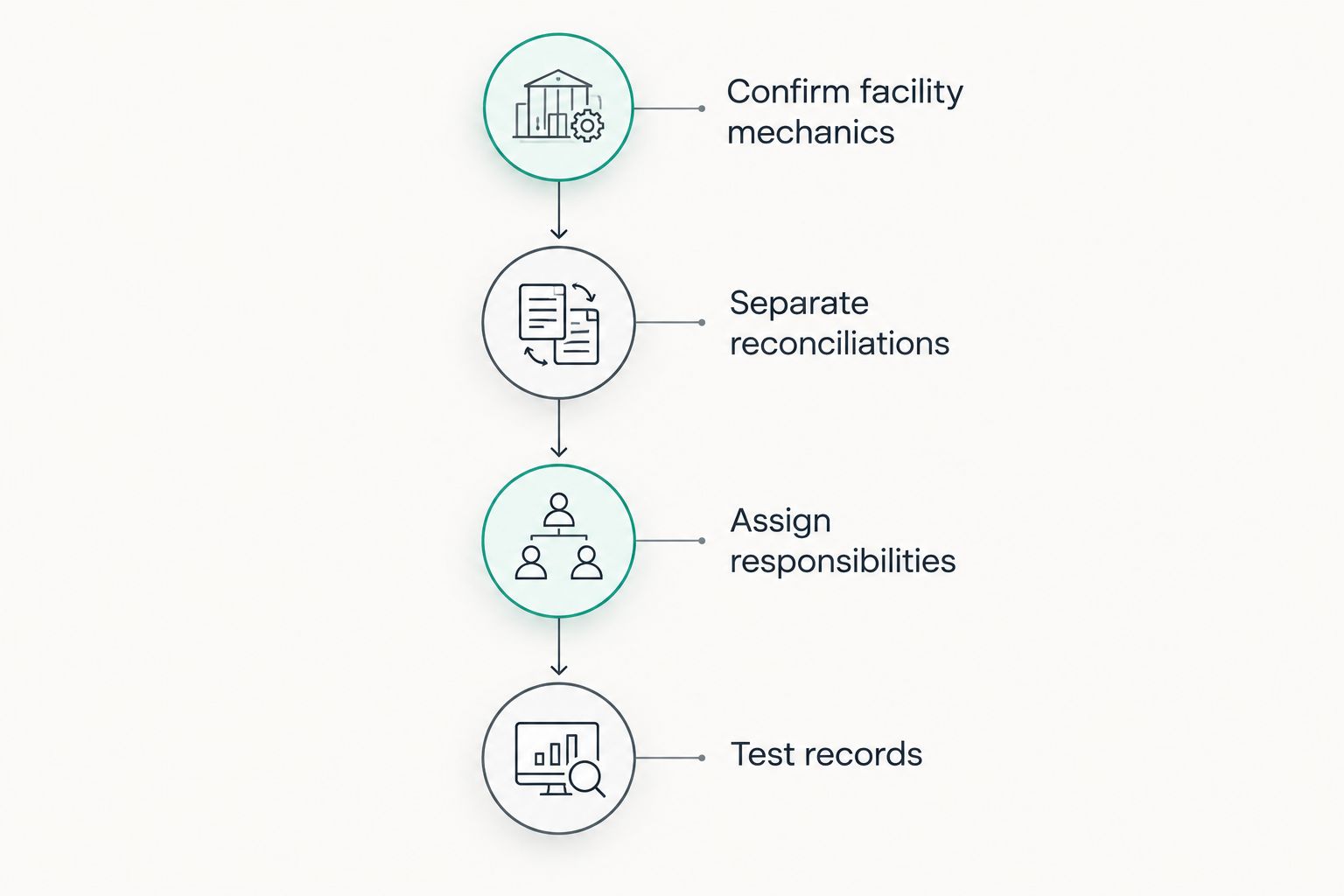
The control that matters most is separation: receiving finance against an invoice is not the same event as receiving payment from the customer. Ask your accountant to document the accounting treatment for the signed facility rather than copying entries from another business.
Variant: refresh the workflow when receivables change
An initial application pack becomes stale when invoices, receipts or credit notes change. For an operating facility in 2026, refresh the reporting according to the signed agreement and the lender’s instructions—not an assumed universal schedule.
- Identify what has changed since the previous submission: new invoices, customer payments, disputes, credit notes or amended due dates.
- Generate the required updated report. Preserve the previous submitted version so the lender can trace movements between reporting dates.
- Check whether an amendment requires a replacement file, an adjustment notice or a change through the lender’s supported connection. Do not upload the same invoice as a new item merely because its details changed.
- Reconcile the lender’s recorded position to your accounting records. Escalate unexplained changes in eligibility or funding availability before making cash commitments against them.
Expected result: Updated information reaches the lender without obscuring the history of earlier submissions.
For connected workflows, nominate a person to review connection errors and permission changes. Automated transfer removes a handling task; it does not resolve disputes, interpret contracts or confirm that a customer has paid.
Troubleshooting
The debtor report does not match the accounting balance
Check the reporting date, report scope and relevant postings first. Compare like-for-like balances before investigating individual invoices. Have your accountant explain the difference; do not insert a spreadsheet adjustment solely to make the totals agree.
The lender accepts less than the debtor balance
Request a reconciliation showing the lender’s eligibility adjustments and any reserves under the proposed or signed facility. Review disputed invoices, customer exposure and supporting evidence against the actual terms. Do not describe the difference as an accounting error without checking its cause.
A customer payment appears to have cleared the wrong balance
Trace the bank receipt, invoice allocation and lender collection record. Check for duplicate entries or a funding advance incorrectly allocated as a customer receipt. Correct the accounting treatment with your accountant and notify the lender if its records also need correction.
A connection stops transferring data
Check authorised access, connection status and the lender’s support instructions. Confirm the date of the last successful transfer before using an approved fallback submission. Do not send replacement files until you understand how the lender prevents duplicate records.
Existing banking security blocks progress
Provide the relevant facility and security documents to the broker and obtain the lenders’ requirements. Resolve consent, priority or release arrangements before scheduling settlement. A clean Xero ledger does not remove an existing lender’s rights.
Customise your workflow
Use the invoice finance exercise to review how the business funds its operating cycle. Compare customer collection timing with supplier commitments, payroll, equipment repayments and existing banking obligations. Keep the working-capital requirement separate from long-term asset purchases so each borrowing purpose is clear.
For the 2026 review, prepare a short decision brief: what funding problem needs solving, which receivables support the request, what security already exists and which reporting tasks the business can maintain. Give the broker evidence, not a preferred product label.
Glenclair’s invoice finance discussion should sit within that wider commercial borrowing review. Ask for an assessment of fit, security implications and operating responsibilities before requesting implementation of a particular connection.
Review your commercial borrowing structure
Discuss receivables, existing facilities and the reporting needed for a lender assessment.
FAQ
Can I get invoice finance directly from my Xero debtor ledger?
A Xero debtor ledger supports an invoice finance assessment; it does not establish approval. The lender assesses the business, invoices, debtors, supporting evidence and proposed security arrangements.
Which Xero report should I prepare for invoice finance?
Prepare the report specified by the lender, with Aged Receivables Detail providing an invoice-level starting point. Confirm the reporting date, ageing basis and export format before submission.
Does every invoice finance lender connect directly to Xero?
Do not assume a direct Xero connection exists. Ask the selected lender to confirm its supported submission method, permissions and treatment of updates before authorising access.
Can I fund every unpaid invoice shown in Xero?
An unpaid invoice is not automatically eligible for funding. The lender applies its own assessment and facility rules, including its treatment of disputes, supporting evidence and debtor exposure.
Should a funding advance mark the customer invoice as paid?
A funding advance is not a customer payment. Have your accountant document the entries for the signed facility and reconcile customer receipts separately from lender funding movements.
Can I use invoice finance alongside existing business loans?
Assess invoice finance alongside existing loans and their security arrangements. Consent, priority or release requirements need resolution before a new facility can proceed.
Is borrowing above A$2 million required for a review?
A$2 million is the preferred planning focus for this commercial borrowing discussion, not a universal eligibility rule. Suitability depends on the business, funding purpose, debtor book and proposed structure.
One last thing
Keep the unchanged export that supported each submission. A live ledger keeps moving, so reopening the same report later does not necessarily reproduce the information the lender assessed. The dated export and its reconciliation give both sides a shared reference when questions arise.
Related guides
- Equipment finance options for manufacturing businesses
- Truck finance options for Australian transport fleets
- Income requirements for commercial property finance
Written by the Glenclair Financial team.